1 Вниз
0 Пользователей и 1 Гость просматривают эту тему.
- 1 Ответов
- 1639 Просмотров

1 Вверх
Проект Joomla! рад сообщить о выходе Joomla 6.1.4 и Joomla 5.4.9. Это релизы безопасности и исправления ошибок для серий 5.x и 6.x.
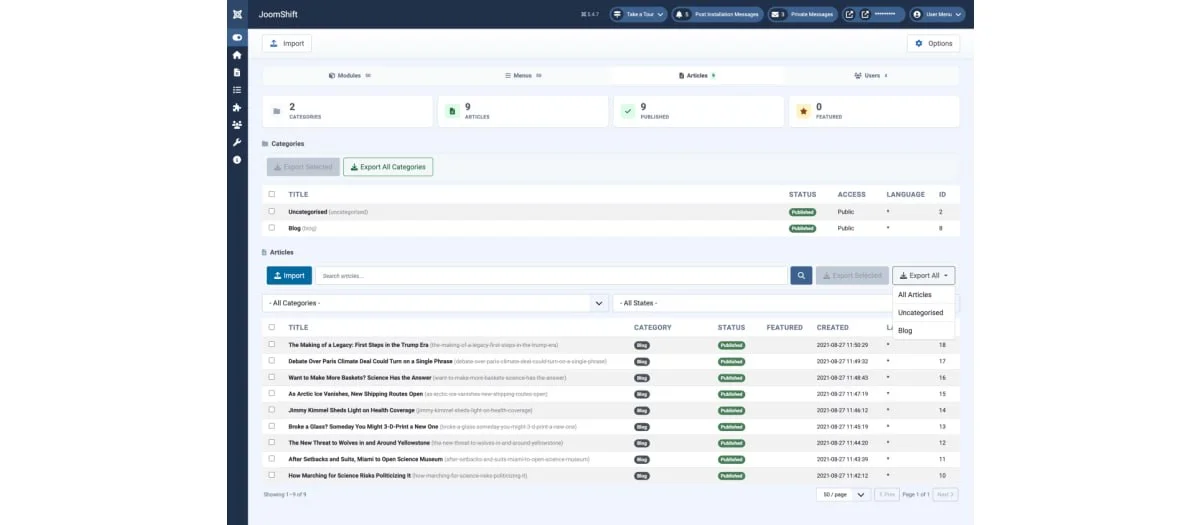
JoomShift - компонент переноса контента между Joomla сайтами.Он позволяет экспортировать модули, меню, материалы, категории, пользовательские поля и пользователей в виде переносимых JSON/ZIP-файлов, а затем импортировать их в любую другую установку Joomla.
Возможности компонента:- Модули — полная настройка, назначение пунктов меню, позиционирование и содержимое SP Page Builder.
-Меню — иерархия родительских/дочерних элементов, типы элементов, ссылки, уровни доступа и параметры. Отсутствующие типы меню создаются автоматически, а элементы, указывающие на неустановленные компоненты, пропускаются с предупреждением.
-Статьи и категории — контент, метаданные, изображения и иерархия категорий.
-Пользовательские поля — группы полей, определения, ограничения по категориям и значения (включая поля с несколькими значениями) — экспортируются и автоматически создаются заново на целевом сайте.
-Пользователи — данные профиля, назначения групп и хэши паролей, чтобы учетные записи работали сразу после импорта.
-Кросс-версииJoomla - компонент адаптируется к различиям в схеме базы данных между версиями Joomla.
-Создан для крупных сайтов — постраничные списки (20/50/100/250строк) и автоматический пакетный экспорт для сайтов с более чем 500 элементами, поэтому он продолжает работать на обычном хостинге.
-Опция перезаписи — обновляет совпадающие элементы при повторном импорте вместо создания дубликатов.
-Drag-n-drop импорт с подробным отчетом о том, что было импортировано, обновлено или пропущено, и почему.
На момент написания заметки для скачивания необходима регистрация/логин на сайте разработчика.
-Joomla Extensions Directory-Страница расширения#joomla#расширения
Кроме этого, в состав пакета установки входит плагин, который позволяет выводить атрибуты товара в список всех товаров, менять эти атрибуты и добавлять товар в корзину из списка товаров. Если атрибутов много, то их можно выводить в всплывающем (модальном окне).
В модуле предусмотрено 2 макета дизайна для Bootstrap и UIkit и максимальная кастомизация для переопределения макетов в шаблон.Демо расширенияСтраница расширения